

Writers have an unfair advantage on Instagram that most of them never use. The platform may look like it runs on photos and video, but captions are where readers decide whether to follow, save, and click through to a blog. If you can hold attention in a paragraph, you can hold it in a caption. The trouble is usually not the writing itself; it is knowing how long to go, when to post, and how to turn a feed into a path back to your work.
This list is split in two. The first half covers captions: structure, hooks, and the small formatting choices that make a wall of text readable on a phone. The second half covers scheduling: how often to post, when, and how to build a rhythm around a blogging calendar you already keep. Take what fits your genre and ignore the rest.
1. Write the First Line as a Headline
Instagram cuts captions off after roughly 125 characters and hides the rest behind “more.” That first line has one job: make the reader tap. Treat it the way you would treat a blog title or a chapter opening. A specific claim, a question that names a real frustration, or the most surprising sentence from your post all work better than “New blog post is live!”
Draft three first lines for every caption and choose the one you would stop scrolling for. If you write fiction, the first line of a scene often works as is; if you write nonfiction, lead with the takeaway and let the caption explain it.
2. Use Line Breaks Like Paragraphs
Dense captions get skipped even when the writing is good. Break your text every one to three sentences, leaving a blank line between blocks, exactly as you would format a blog post for mobile. Short paragraphs make a long caption feel quick, and quick-feeling captions get read to the end.
Instagram sometimes strips blank lines if a line ends with a space, so end each block with punctuation and nothing else. If spacing still collapses, type the caption in your phone’s notes app and paste it in.
3. Pick One Caption Length Per Post Type
You do not need to write an essay every time. Decide on three caption modes and match each to a purpose. Micro captions of one or two lines suit quotes and quick Reels. Medium captions of 80 to 150 words suit behind-the-scenes posts and reading recommendations. Long captions of 250 words or more suit the “mini blog post” format that writers do better than anyone.
Long captions are where bloggers win saves. Share a complete, useful idea, then point to the full post for depth. Readers who finish a 300-word caption are exactly the readers who will click your link.
4. End With a Single, Specific Ask
A caption that ends with nothing leaves engagement on the table. A caption that ends with four requests gets none of them. Choose one: a question that is easy to answer in a few words, a prompt to save the post for later, or an invitation to tap the link in your bio for the full article.
Rotate the asks across the week so the feed does not feel like a sales page. Questions drive comments, “save this” drives saves, and link prompts drive traffic; each matters, but not in the same post.
5. Repurpose Your Blog Into Caption Series
Every long article you publish contains five to ten Instagram captions. A listicle becomes one post per item. A personal essay becomes a quote graphic, a story-behind-it caption, and a “what I’d change now” follow-up. An interview becomes a carousel of the best answers.
Keep a spreadsheet with one row per article and columns for the captions you have pulled from it. Writers often run out of ideas because they are generating new material for Instagram when their archive is already full of it.
6. Keep Hashtags Out of the Way
Hashtags still help readers find bookish and writing content, but they clutter a caption. Put five to ten specific tags in the first comment or after several line breaks at the bottom of the caption. Favor niche tags that describe the actual content (your genre, your topic, your city’s literary scene) over giant generic ones where posts vanish in seconds.
More importantly, write captions that contain the words people search. Instagram’s search now reads caption text, so “cozy mystery recommendations for fall” in plain language does more than a hashtag of the same phrase.
7. Write Alt Text for Every Image
Alt text makes your posts usable for readers who rely on screen readers, and it gives Instagram another description of what the image shows. Under advanced settings before you publish, write one plain sentence describing the picture: “Open paperback on a wooden table beside a mug of black coffee.” It takes twenty seconds.
Avoid stuffing it with keywords. A clear, honest description serves the reader and discovery better than a list of terms.
8. Give a New Author Account a Visible Starting Point
Writers often launch an Instagram account the same week as a newsletter, a book, or a blog relaunch, which means the profile has ten followers and posts with two likes each at the exact moment they are sending people to it. Visitors read that as a sign to move on, however good the captions are. Some writers address this with a small starter order from FastSocial, which sells followers from $2.99 with a free drip option that spreads delivery over several days, lets likes be split across recent posts, and asks only for a username at checkout.
Be clear-eyed about it. Purchased followers do not read your posts, leave comments, or buy your book the way earned readers do, so keep any order modest, choose drip delivery, keep the account public while it runs, and stay within Instagram’s terms. Use it only to get past the empty-page impression, rely on the 30-day refill if counts slip, and let your writing do the real work of building an audience.
9. Post on a Rhythm Tied to Your Publishing Calendar
Writers already keep schedules: a weekly blog post, a monthly newsletter, a serialized chapter every Friday. Anchor your Instagram cadence to that. The day a post goes live gets a feed post with a long caption and a link prompt. Two days later, a carousel pulls out the key points. Later in the week, a Reel or Story teases the next piece.
This turns one piece of writing into a week of content and means you never have to ask “what should I post today?” because the publishing calendar already answered it.
10. Three to Four Feed Posts a Week Is Plenty
Daily posting is a fast route to thin captions and burnout. For most writers, three to four feed posts a week, with at least one Reel among them, is enough to stay visible and leaves time for the writing that is supposed to be the point. Quality captions with saves and shares will out-reach a daily stream of filler.
If you can only manage two posts a week, make them count and supplement with Stories. Consistency over months matters far more to Instagram than frequency in any single week.
11. Find Your Best Time From Your Own Data
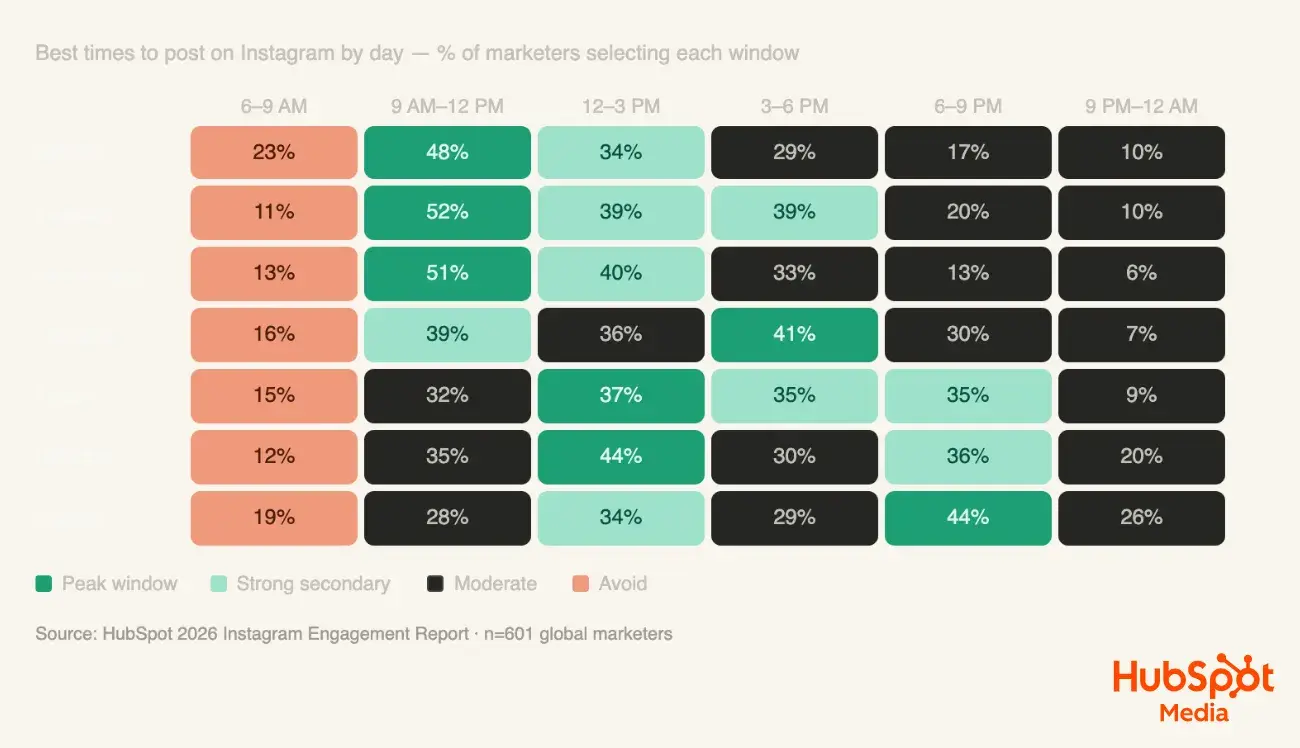
General advice about “best times to post” is nearly useless, because readers of literary fiction and readers of productivity blogs keep different hours. Open Insights, look at the “most active times” chart for your followers, and post thirty to sixty minutes before the peak so your post is already gathering engagement when the crowd arrives.
Test two time slots for a month each and compare reach on comparable posts. Pick the winner and stop thinking about it; the time matters less than the caption and the consistency.
12. Batch-Write Captions Like a Drafting Session
Captions written minutes before posting read like it. Set aside one writing session a week, treat it like any other drafting block, and write every caption for the coming week in one sitting. You will keep a consistent voice, catch weak first lines, and have time to let a caption rest before it goes out.
Schedule the finished posts through Meta Business Suite or the in-app scheduler so publishing happens on time whether or not you are at your desk. Then use the saved time to write the next real piece.
13. Use Stories for the Drafting Process
Readers love seeing how writing gets made. Stories are the place for the messy desk, the crossed-out outline, the “which title?” poll, and the quick voice note about what you are working on. They cost almost nothing to produce and keep you present on days without a feed post.
Polls and question stickers do double duty: they create engagement that pushes your feed posts higher, and they hand you material. A question box asking “what should I write about next?” has filled more than one blogger’s editorial calendar.
14. Review Captions Monthly and Keep a Swipe File
Once a month, sort your posts by saves and by comments. Read the top five captions in each group out loud and note what they share: the opening move, the length, the ask at the end. Copy those captions into a document, your own swipe file, and reread it before each batching session.
Do the same with captions from writers you admire. You are not copying their words; you are studying structure, the way you would study the opening pages of a novel.
Putting It Together
A workable system for a writer looks like this: one weekly drafting session produces three to four captions of varied length, each with a headline first line, clean line breaks, plain-language keywords, alt text, and a single ask. Posts are scheduled around the publishing calendar and timed to your followers’ active hours. Stories fill the gaps with process and polls, and a monthly review feeds the swipe file.
If you are launching the account alongside a book or a blog, handle the empty-page problem early and modestly, whether through a launch push to your newsletter list or a small drip-delivered starter order from FastSocial, and then let the captions carry it. Writers do not need to become videographers to grow on Instagram. They need to treat the caption as the main event and show up on a schedule they can keep.
